
How to handle the uncomfortable state where the payment provider captured money but commerce, OMS, or ERP did not complete the order path.
Book discovery · Read integration services
In this guide
- The captured-payment/order-failed state model
- Reconciliation evidence fields
- Owner decisions for repair, refund, and posting
- Build and testing checklist
- Monitoring and operating model
- FAQs
Why this matters
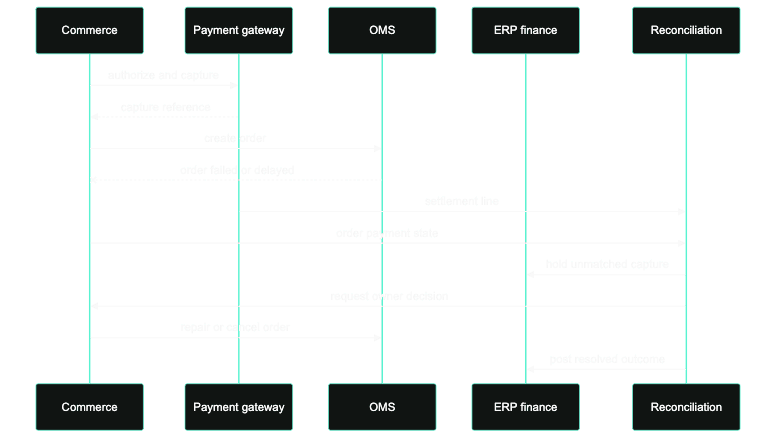
Payments get expensive when a team treats gateway state and order state as one record. They are two records with two clocks. A payment can be authorized, captured, reversed, refunded, disputed, or settled while the commerce order is still missing, cancelled, duplicated, or rejected downstream.
The incident that hurts is not a "payment error." It is a captured payment with no trustworthy order outcome: the customer has been charged, and no system can say what they bought or whether it will ship. That state needs one reconciliation owner before customer service, finance, and engineering each apply a different correction and turn one charge into a refund, a duplicate order, and a chargeback.
Captured-payment/order-failed state model
- Authorized / order not created: reserve is open; commerce must decide whether to retry order creation or let authorization expire.
- Captured / order creation failed: finance exposure exists; commerce and payment owner decide repair or refund.
- Captured / OMS rejected: fulfillment cannot proceed; OMS owner must classify inventory, address, fraud, or allocation cause.
- Captured / ERP posting failed: customer may have an order but finance lacks posting; finance owner controls repair evidence.
- Refunded / order later created: duplicate correction risk; support and finance need a single closure note.
- Settled / no ERP invoice: end-of-day reconciliation must hold the settlement line until owner decision.
Reconciliation evidence fields
Every exception should carry:
payment_intent_idor PSP authorization reference.capture_id, amount, currency, capture timestamp, and capture method.commerce_order_codeand immutable cart/order GUID.transaction_entry_codeor payment transaction row used by commerce.webhook_event_id, delivery attempt, and signature validation result.- OMS status, ERP posting status, invoice reference, and settlement batch id.
- duplicate/replay marker showing whether a webhook or order export can run again.
- owner decision: repair order, create support order, refund, void, hold settlement, or escalate.
Owner decisions for repair, refund, and posting
The payment owner should not decide order repair alone. The commerce owner proves whether the order can still be created safely. OMS proves whether fulfillment can still happen. Finance proves whether a capture can be posted or must be refunded. Customer service owns the customer-facing message only after the financial and fulfillment state is known.
Decision paths that prevent bad fixes
The reconciliation team should treat each exception as one of four decision paths. The first path is repair order creation. Use it when payment is captured, the customer intent is valid, stock can still be allocated, and the order failed because commerce or OMS rejected a recoverable record. The repair action might be fixing an address normalization issue, releasing a fraud hold, correcting a cart state, or replaying a webhook with the original idempotency key.
The second path is refund and close. Use it when the customer cannot receive the order, the commerce order cannot be recreated safely, or the elapsed time makes fulfillment promise unreliable. The evidence must show PSP refund reference, customer message, support case, and finance posting state. A refund without support context creates repeat contacts.
The third path is post finance evidence. Use it when the order exists and the customer outcome is correct, but ERP, invoice, or settlement records are missing. This path is owned by finance with commerce and PSP evidence attached. Do not let engineering close the incident only because an API replay succeeded.
The fourth path is hold and escalate. Use it when two systems disagree and replay could create a duplicate charge, duplicate order, or incorrect settlement. The hold path should stop automated retries, preserve all identifiers, and name the person who can decide within the settlement window.
Use a state row that separates money, order, fulfillment, and posting:
payment_order_exception:
  psp_reference: "pi_3PR..."
  capture_id: "ch_3PR..."
  amount: "129.00"
  currency: "EUR"
  capture_timestamp: "2026-05-23T18:41:12Z"
  commerce_order_code: null
  cart_guid: "4f72a1..."
  webhook_event_id: "evt_1PR..."
  webhook_replayable: true
  oms_status: "not_created"
  erp_posting_status: "not_posted"
  settlement_batch_id: "pending"
  owner_decision: "repair_order_creation_before_settlement_cutoff"
This is the level of evidence that prevents three bad fixes: refunding a payment that still belongs to a recoverable order, creating a manual order without linking the payment, or letting a settlement batch close while finance has no order reference.
Reconciliation controls by time window
Timing matters. During the first few minutes after checkout, the team is usually deciding whether a webhook, order creation, or OMS allocation can catch up. During the first business hour, the team is deciding whether a customer-visible order should be repaired or support should intervene. Before settlement cut-off, finance needs to know whether captured funds have a valid order reference. After settlement, the control changes again: the evidence must support posting, refund, or chargeback handling.
The runbook should reflect those windows:
- 0 to 5 minutes: inspect webhook delivery, order creation logs, duplicate protection, and PSP state before contacting the customer.
- 5 to 60 minutes: assign commerce, OMS, PSP, and finance owners; freeze risky replays; decide repair versus refund.
- Before settlement: reconcile capture references with order codes, ERP postings, invoices, and manual support orders.
- After settlement: require finance closure evidence and keep the customer-service note aligned with money movement.
The operational target is not zero exceptions. The target is no unidentified money state at settlement close and no customer charged without a support-visible decision.
What to test before launch
Run rehearsals for successful authorization with failed order creation, duplicate capture webhook, capture accepted but OMS rejects allocation, refund completed but ERP posting fails, and settlement received before commerce status is final. Each rehearsal should produce a dashboard signal, an owner assignment, and closure evidence.
Triage before any technical replay
The runbook should start with "customer charged?" and "order fulfillable?" before any technical replay step. If the answer to either question is unknown, freeze automated retries and collect PSP, commerce, OMS, and ERP evidence first.
The daily reconciliation view should group unmatched captures, duplicate webhook deliveries, failed refunds, missing ERP postings, and settlement lines without order references. Those groups need different owners. A single “payment errors” queue hides the difference between customer-impact, finance-impact, and technical delivery-impact exceptions.
Reporting the incident to stakeholders
Stakeholder reporting should avoid gateway jargon. The useful summary is: number of customers charged, number with complete orders, number awaiting repair, number refunded, amount held for finance review, oldest unresolved capture, and next decision deadline. That gives commercial, finance, and support leaders a shared picture.
Do not report only incident counts. A single high-value B2B order may matter more than many low-value authorizations that will expire. Include amount, market, channel, and fulfillment status when the exception affects cash or customer promise. The report should also say whether automated retries are running, paused, or blocked by duplicate risk.
When the incident closes, keep a short permanent note with the PSP reference, order code, settlement batch, refund or invoice reference, root cause, and prevention action. That note becomes the audit trail for finance and the pattern library for future runbooks.
Reconciliation runbook checklist
- Alert on captured payments without commerce order codes.
- Store webhook event id, replay count, and signature validation result.
- Separate authorization expiry decisions from capture refund decisions.
- Require finance evidence before closing a settlement mismatch.
- Test duplicate webhook delivery and late settlement files before launch.
- Give support one closure note that matches payment, order, OMS, and ERP state.
FAQs
Should the team refund every captured payment without an order?
No. Some captures belong to recoverable orders. The runbook must first determine whether order creation can be repaired safely and whether fulfillment can still proceed. Refunds are correct when the customer cannot receive the order or finance cannot post it reliably.
What is the first dashboard question?
Start with “customer charged?” and “order fulfillable?” Those two questions sort the incident into customer recovery, operational repair, or finance reconciliation instead of generic payment debugging.
Who should own reconciliation closure?
Finance owns the final money-state closure, but commerce, OMS, and payment owners must supply the evidence. The incident is not closed until the support note can explain the customer, order, and settlement outcome.
Related pages
Review reconciliation failure paths.
CCI can map captured-payment/order-failed states, owner decisions, and finance evidence before the next settlement mismatch becomes a customer incident.
Next step
Turn the article into an execution conversation.
Use the linked reconciliation-review CTA as the practical follow-through for this topic without turning the page into a wall of extra boxed UI.
Open reconciliation-reviewRelated field guides

SAP Commerce OAuth client setup checklist for integration teams
A practical checklist for configuring SAP Commerce OAuth clients, grant types, scopes, redirect behavior, and operational controls without creating fragile authentication paths.
Architecture Decision
Commerce integration error patterns playbook
Commerce integration error patterns playbook
A field guide for classifying recurring commerce integration errors, assigning ownership, and turning incidents into better contracts, monitoring, and recovery paths.