How to govern the contract surfaces that make SAP Commerce integrations operable: OCC APIs, CronJobs, ImpEx, process events, ERP acknowledgements, and support evidence.
Book discovery · Read integration services
In this guide
- OCC, CronJob, ImpEx, and ERP contract surfaces
- Contract evidence matrix
- Replay and failure ownership
- Build and testing checklist
- Monitoring and operating model
- FAQs
Why this matters
SAP Commerce integrations fail when teams treat OCC endpoints, CronJobs, ImpEx imports, process engine events, and ERP acknowledgements as unrelated implementation details. They are contract surfaces. Each one has fields, owners, runtime behavior, retry rules, and evidence requirements. If those contracts are not named, defects bounce between storefront, platform, integration, and ERP teams.
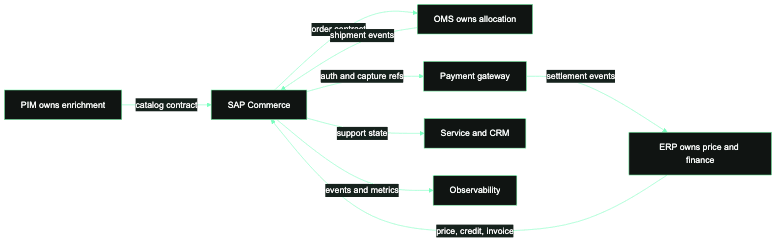
The practical goal is a contract map that a release manager and support lead can both use. It should show which interface created a record, which system accepted it, what acknowledgement proves the outcome, and who can repair the next failure.
Contract surfaces to govern
- OCC APIs: request schema, response schema, authentication scope, customer context, cache behavior, validation errors, and client-visible status.
- CronJobs: job code, trigger cadence, last successful run, item count, reject count, rerun control, and support owner.
- ImpEx imports: catalog version, unique keys, validation mode, unresolved references, reject files, and rollback method.
- Process engine: process code, task state, retry count, wait node, event name, timeout, and manual intervention path.
- ERP acknowledgements: business reference, accepted/rejected state, error code, duplicate detection, and finance/fulfillment consequence.
- Observability: correlation id, order or product key, dashboard link, alert threshold, and closure evidence.
Contract evidence matrix
Use this as the minimum row for any critical SAP Commerce integration:
sap_commerce_contract:
  surface: "CronJob -> ERP order export"
  owner: "integration lead"
  business_object: "order"
  source_key: "OrderModel.guid"
  external_key: "erpSalesOrderNumber"
  trigger: "order export event / retry job"
  success_evidence: "ERP acknowledgement attached to order"
  reject_evidence: "ERP error code plus payload snapshot"
  replay_rule: "same idempotency key, no replay if ERP reference exists"
  support_view: "backoffice order tab + integration dashboard"
Failure ownership
An OCC validation error belongs to the team that changed the API contract or the client that sent an invalid request. A CronJob failure belongs to the job owner until the underlying rejected record proves another owner. An ImpEx reject belongs to the data owner when the file is invalid, and to the platform owner when validation behavior changed. An ERP acknowledgement failure belongs to ERP when the business rule rejects a valid payload, and to integration when mapping created an invalid one.
This ownership model keeps SAP Commerce from becoming the default blame target. The platform should expose evidence, not absorb every downstream ambiguity.
Boundary examples worth documenting
Document the OCC boundary with real examples: the storefront request shape for add-to-cart, checkout, customer update, and order history; the response fields customer service relies on; the OAuth scopes used by browser and worker clients; and the error payloads shown when validation fails. If the storefront sees a generic error but OCC emitted a specific validation code, support needs a way to connect those records.
Document the CronJob boundary by job code, trigger, item selection rule, batch size, retry behavior, and failure output. A job named erpOrderExportJob is not a contract. A contract says which orders are selected, how already-exported orders are excluded, what happens after partial failure, where reject details are stored, and who can rerun the job.
Document the ImpEx boundary by catalog version, unique keys, unresolved reference handling, validation mode, and rollback evidence. A file that imports successfully can still publish wrong data if it targets the wrong catalog version or relies on non-unique keys. The contract should include sampled records that prove the target state, not only import success.
Document the ERP boundary by acknowledgement semantics. The team needs to know the difference between accepted, rejected, duplicate, pending, timeout, and lost acknowledgement. Each state should map to a repair action, replay rule, and owner. Without that map, the same order can be retried by integration while ERP already owns a valid sales order.
Release governance for contract changes
Treat contract changes as release items. A new OCC field, CronJob trigger, ImpEx unique key, or ERP acknowledgement code can break downstream behavior even when the deployment is technically successful. The release checklist should name the contract, the change, the consumer, the rollback behavior, the sample payload, and the monitoring signal that proves production is healthy.
For SAP Commerce programs with multiple teams, a lightweight contract register is usually enough. It does not need to become a heavy architecture repository. It needs to answer practical questions: what changed, who consumes it, how to test it, what to monitor, and who owns incidents.
What to test before launch
Test a successful path and a rejected path for each contract surface. For OCC, prove invalid scope, invalid payload, and expired session behavior. For CronJobs, prove failure visibility, rerun safety, and item-level rejects. For ImpEx, prove missing references, duplicate keys, and rollback evidence. For ERP acknowledgements, prove accepted, rejected, duplicate, and lost-ack scenarios.
Operate with contract drift reviews
Review contract drift during release readiness. Ask which fields changed, which jobs changed cadence, which imports changed unique keys, which OAuth clients changed scopes, and which dashboards no longer match the business outcome. SAP Commerce stays operable when contracts are treated as living production assets, not one-time delivery notes.
Use drift reviews to remove old contracts as well. Retired OCC endpoints, unused CronJobs, stale ImpEx templates, disabled OAuth clients, and dead dashboards create confusion during incidents. A clean contract map is easier to operate than a complete archive of everything that once existed.
What the contract register should contain
The register can be a small table, but the fields should be specific. Include contract name, SAP Commerce extension or surface, owning team, consuming system, business object, source identifier, external identifier, authentication method, expected success signal, expected rejection signal, replay rule, rollback rule, dashboard, runbook, and last verified date. Those fields make the register operational rather than decorative.
For OCC contracts, attach sample request and response payloads for success and validation failure. For CronJobs, attach the job code, trigger, selection query, and item-level rejection output. For ImpEx, attach the file template, target catalog version, unique key rules, and sample rejected row. For ERP or OMS boundaries, attach accepted, rejected, duplicate, and timeout samples. For OAuth, attach client id, grant type, scopes, redirect URIs, and rotation owner.
The register should also flag contract criticality. A storefront product recommendation contract is useful, but it is not the same risk as checkout, payment, order export, customer login, or inventory promise. Critical contracts should have automated tests and release sign-off. Lower-risk contracts may need only owner review and dashboard evidence. That distinction keeps governance practical.
How to use this during incidents
During an incident, the contract register should answer “where do we look first?” If an order has no ERP reference, the team checks the order export contract, not a random set of logs. If an ImpEx import rejects categories, the team checks unique key and catalog version rules before changing storefront code. If OCC returns a different validation payload after a release, the team checks the consumer contract before blaming frontend error handling.
This is the real value of the contract map: it shortens the path from symptom to owner. A team that can name the boundary can usually name the evidence, and a team that can name the evidence can decide whether to repair, replay, rollback, or escalate.
SAP Commerce contract checklist
- Name the owner for every OCC, CronJob, ImpEx, process, and ERP contract.
- Keep one source key and one external key visible in every dashboard.
- Store sample success and rejection payloads for support.
- Test replay safety before enabling automated retries.
- Review OAuth scopes and redirect behavior with each release.
- Close failures with business evidence, not only technical recovery.
FAQs
What is a SAP Commerce integration contract?
It is the documented behavior around a boundary: fields, identifiers, authentication, success evidence, rejection evidence, replay rules, and ownership. OCC APIs, CronJobs, ImpEx imports, and ERP acknowledgements all need contracts.
Why include CronJobs and ImpEx in the contract map?
Because many SAP Commerce incidents happen in jobs and imports rather than storefront requests. If those contracts are invisible, support teams cannot tell whether data, platform behavior, or integration mapping caused the failure.
How often should contracts be reviewed?
Review them before major releases, platform upgrades, OAuth changes, ERP changes, and cutover rehearsals. Also review any contract that creates repeated support tickets or manual data repair.
Related pages
Review SAP Commerce integration contracts.
CCI can map the contract surfaces that matter in your SAP Commerce estate and turn them into supportable release evidence.
Next step
Turn the article into an execution conversation.
Use the linked integration-audit CTA as the practical follow-through for this topic without turning the page into a wall of extra boxed UI.
Open integration-auditRelated field guides

SAP Commerce OAuth client setup checklist for integration teams
A practical checklist for configuring SAP Commerce OAuth clients, grant types, scopes, redirect behavior, and operational controls without creating fragile authentication paths.

SAP Commerce upgrade testing matrix: what to prove first
A SAP Commerce upgrade testing matrix for ranking storefront, OCC, Backoffice, CronJob, data migration, search, and integration risks before regression expands.