
What to monitor, how to write runbooks, and who owns failures in production ecommerce integrations.
Book discovery · Read integration services
In this guide
- Incident-command template
- Alert quality and first five checks
- Replay, rollback, and closure evidence
- Build and testing checklist
- Monitoring and operating model
- FAQs
Why this matters
Dashboards are not runbooks. A dashboard can show queue depth, API errors, stale jobs, or rejected payloads, but it does not decide who owns the next action. Commerce integration operations need an incident-command template that turns signals into the first checks, owner decisions, replay controls, rollback options, customer communication, and closure evidence.
The strongest runbooks are short enough to use during pressure and specific enough to prevent blind retry. They name the business object, the customer effect, the first five checks, the owner, and the recovery boundary.
Incident-command template
runbook:
  trigger: "orders missing ERP acknowledgement for 15 minutes"
  severity: "high during trading hours, critical during peak"
  commander: "commerce operations lead"
  first_five_checks:
    - "new checkout errors"
    - "queue age and dead-letter count"
    - "ERP endpoint health"
    - "payment capture/order mismatch count"
    - "oldest affected order and market"
  pause_rule: "stop automated replay if duplicate ERP references are possible"
  replay_rule: "same idempotency key after owner approval"
  rollback_rule: "disable export job only after customer-order intake decision"
  closure_evidence: "order status, ERP reference, payment state, support note"
Alert quality
An alert is useful when it carries object, owner, age, business effect, and first action. “Integration failed” is not useful. “26 paid orders in DE have no ERP acknowledgement after 15 minutes; oldest order 10004561; ERP endpoint healthy; queue age rising; commander commerce operations” is useful.
Build alerts around business queues: order export, payment reconciliation, seller offer publication, search indexing, customer login, product import, and settlement. Technical signals still matter, but they should be attached to the business object they threaten.
First five checks by incident type
The first checks should be deterministic enough that an on-call engineer, operations lead, or support commander can run them without inventing a new investigation. For order export, check checkout errors, queue age, ERP health, oldest affected order, and duplicate-reference risk. For payment reconciliation, check PSP capture state, commerce order state, webhook delivery, OMS state, and settlement window. For product import, check source file, rejected row count, catalog version, sampled affected SKUs, and publication status. For search, check index job completion, core freshness, top query sample, zero-result spike, and merchandising overrides. For authentication, check client id, redirect URI, grant type, scope, and raw authorizationserver error.
Writing these checks into the runbook has two benefits. It speeds triage and it exposes missing observability before launch. If the runbook says “check oldest affected order” but no dashboard can show that order, the dashboard is incomplete. If the runbook says “check raw OAuth error” but support only sees a branded login failure, the support surface is incomplete.
Severity should be business-specific
Severity cannot be copied from infrastructure templates. A queue depth of 100 may be normal for catalog enrichment and critical for paid orders waiting for ERP acknowledgement. A search indexing delay may be low severity overnight and high severity during a campaign launch. A payment webhook failure may be critical near settlement cut-off and moderate if authorization-only checkout can recover automatically.
Define severity in business language: customer cannot place order, customer charged without order, sellers cannot publish offers, catalog not searchable, finance cannot close, or support cannot explain status. That language helps non-engineering owners join the incident quickly.
Replay, rollback, and communication
Every runbook should say when to pause, replay, suppress, or rollback. Replay needs idempotency and owner approval. Rollback needs a customer-order intake decision. Suppression needs a reason and an expiry. Communication needs one owner who can tell customer service what customers may see and what support should say.
What to test before launch
Rehearse the runbook, not only the alert. Trigger the condition in a non-production environment, assign the commander, run the first checks, pause a job, replay a message, attach closure evidence, and write the customer-service note. If the rehearsal requires a senior engineer to remember undocumented steps, the runbook is not finished.
Operate with post-incident evidence
After each incident, update the runbook with what was missing: a dashboard field, owner, threshold, replay command, support message, or closure signal. The runbook should get shorter and sharper over time.
Minimum runbook set
Most commerce estates need at least six runbooks before launch: order export delayed or rejected, payment captured without order completion, product import rejected, search index stale or failed, customer login/callback failure, and marketplace or supplier offer publication failure. Add a seventh if a warehouse, OMS, or ERP status feed controls customer promise.
Each runbook should have the same shape so teams do not relearn the operating model during every incident. Trigger, severity, owner, first checks, pause rule, replay rule, rollback rule, customer communication, and closure evidence should appear in the same order. Consistency matters because incidents often cross teams; finance, support, platform, and integration owners should not have to decode a new document format while orders are waiting.
Keep old runbooks visible for one release cycle after replacement. The comparison helps teams see which alerts were merged, renamed, or retired.
Metrics that prove the runbooks work
Track time to owner assignment, time to first decision, manual replay count, duplicate replay count, rollback decision time, support-message delay, and closure evidence completeness. These metrics show whether the operating model is improving. Infrastructure uptime alone cannot prove that commerce integration incidents are handled well.
Runbook ownership and review cadence
Every runbook should have an accountable owner and a review cadence. The owner is not the person who wrote the document. The owner is the person who can approve changes to thresholds, first checks, replay rules, rollback criteria, and communication paths. For order export, that may be commerce operations. For payment reconciliation, it may be finance operations with platform support. For search, it may be merchandising and search engineering together. For OAuth, it may be platform security.
Review high-risk runbooks before peak trading, before major releases, and after every incident. The review should check whether thresholds still match traffic, whether dashboards still show the needed fields, whether owners changed, whether retired systems remain in the steps, and whether customer-service messages still match policy. A runbook that is not reviewed becomes another stale artifact.
How to avoid noisy automation
Automation should support decisions, not replace them blindly. Automated retry is useful when a transient endpoint failure is known to be safe. It is dangerous when duplicate orders, captured payments, seller payouts, or finance postings are possible. Automated alerts are useful when they group business objects by owner. They are dangerous when they send every low-level error to the same channel.
Start with narrow automation: classify, assign, freeze risky retries, and provide the first evidence links. Add self-healing only after duplicate handling and closure evidence are proven. The more financial or customer-promise risk a flow carries, the more explicit the approval rule should be.
Evidence pack for each critical flow
Keep a small evidence pack next to every runbook. It should contain one successful payload, one rejected payload, a dashboard screenshot or query, a replay example, a rollback note, a customer-service note, and the owner map. This evidence pack makes onboarding easier and prevents incident response from depending on one engineer’s memory.
Runbook checklist
- Every alert names business object, owner, age, effect, and first action.
- Every replay step includes idempotency and duplicate-check rules.
- Every rollback step names the customer or finance consequence.
- Every incident has one commander and one support message owner.
- Closure requires business evidence, not only green infrastructure.
- Runbooks are rehearsed before launch and after major integration changes.
FAQs
What makes an integration alert actionable?
It names the affected business object, owner, age, severity, likely customer impact, and first action. Without those fields, the alert becomes a prompt for investigation rather than a runbook trigger.
Should runbooks include replay commands?
Yes, but only with preconditions. The runbook should state when replay is allowed, which idempotency key to use, who approves it, and what evidence proves it worked.
Who owns incident communication?
One named support or operations owner should own the customer-facing message. Engineering can diagnose, but support needs a clear statement of customer impact and recovery status.
Related pages
Review runbook coverage.
CCI can turn integration alerts into practical runbooks with owners, first checks, replay rules, rollback gates, and closure evidence.
Next step
Turn the article into an execution conversation.
Use the linked delivery-discovery CTA as the practical follow-through for this topic without turning the page into a wall of extra boxed UI.
Open delivery-discoveryRelated field guides
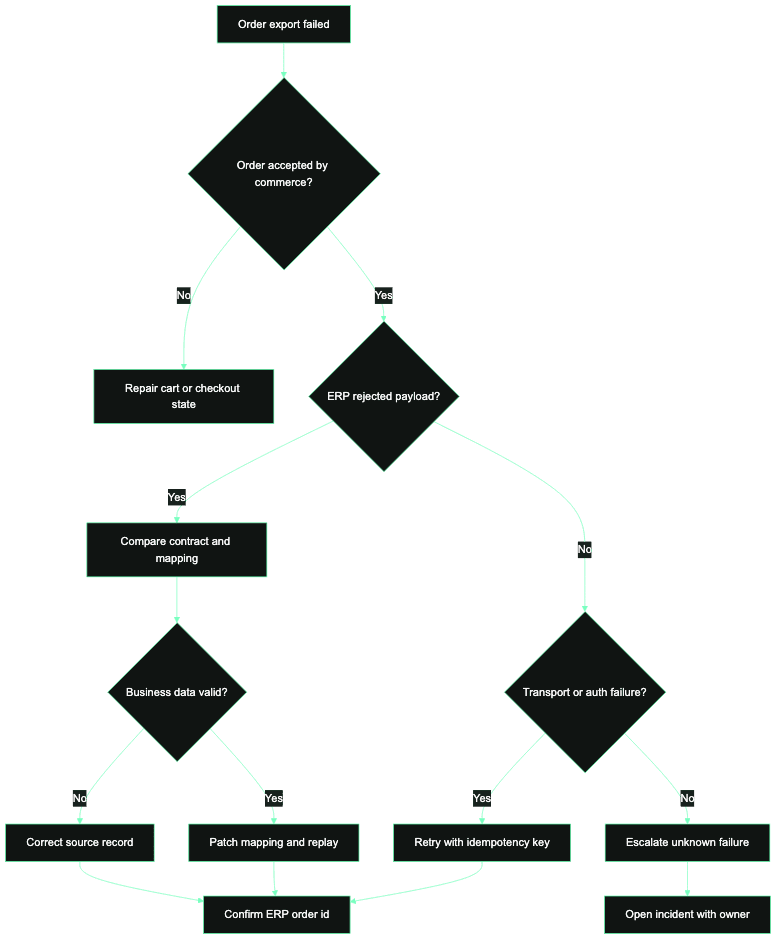
ERP order export failure modes for commerce teams
A field guide for classifying commerce-to-ERP order export failures, assigning owners, and replaying failed orders with evidence.

SAP Commerce OAuth client setup checklist for integration teams
A practical checklist for configuring SAP Commerce OAuth clients, grant types, scopes, redirect behavior, and operational controls without creating fragile authentication paths.