How to classify commerce orders that fail between checkout, middleware, ERP acknowledgement, fulfillment, and finance posting.
Book discovery · Read integration services
In this guide
- Failure classes that need different owners
- Order export evidence fields
- Replay and repair decision tree
- Build and testing checklist
- Monitoring and operating model
- FAQs
Why this matters
ERP order export is where a successful checkout becomes a financial and operational promise. The difficult failures are not simple outages. They are mismatches between a commerce order code, middleware message, ERP sales order reference, payment capture, allocation decision, and customer-visible status.
Treat every failed export as a record with evidence, not as a ticket title. The team should be able to answer which system accepted the order, which system rejected it, whether the rejection is retryable, who can repair the data, and what proof closes the incident.
Failure classes that need different owners
- Commerce validation failure: cart, customer, address, tax, or payment state did not satisfy the export contract. Owner: commerce platform lead.
- Mapping failure: middleware transformed a valid order into an ERP-invalid payload. Owner: integration lead.
- ERP business rejection: price, credit, material, plant, partner, or payment term is not valid in ERP. Owner: ERP process owner.
- Transport or authentication failure: endpoint, credential, certificate, network, or rate limit blocked delivery. Owner: platform operations.
- Duplicate or replay conflict: the same business order already has an ERP reference or partial acknowledgement. Owner: integration and finance jointly.
Order export evidence fields
Use a compact incident row before deciding to replay:
commerce_order_code: the customer-facing order reference.commerce_order_guid: immutable platform identifier used for idempotency.message_id: queue, event, or file record used for replay.erp_sales_order_ref: empty, provisional, or final ERP reference.export_status: queued, sent, acknowledged, rejected, duplicate, repaired, replayed.erp_error_code: the exact business or technical rejection returned by ERP.retryable: yes only when replay cannot create duplicate finance or fulfillment state.owner_decision: retry, repair source data, patch mapping, cancel order, or escalate.closure_evidence: ERP reference, customer status, payment state, and support note.
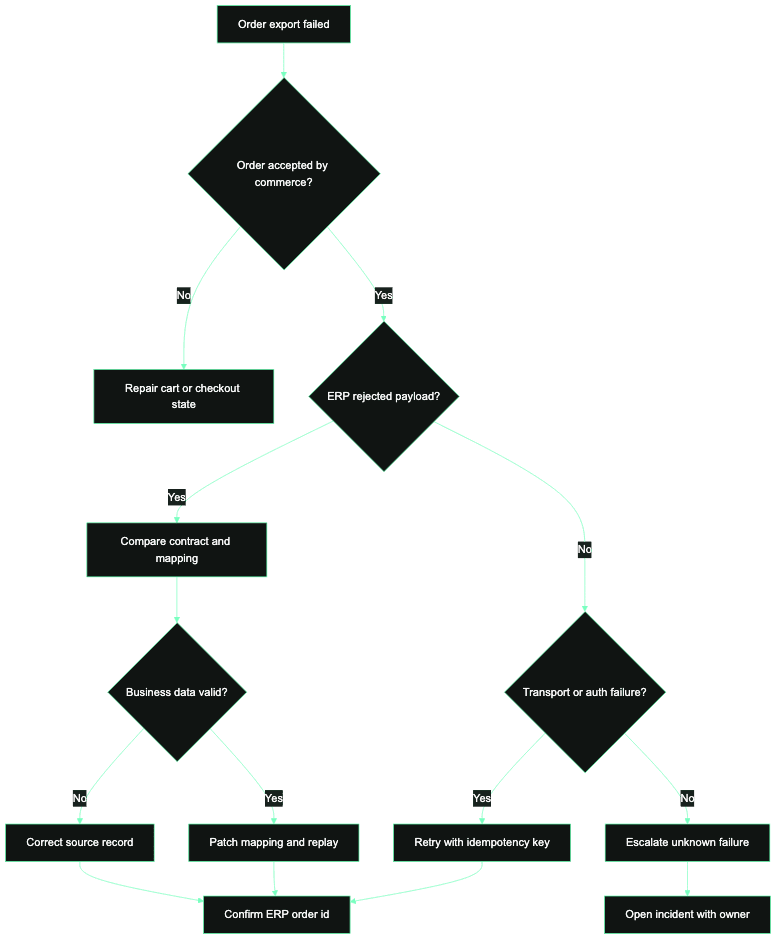
Replay and repair decision tree
Do not replay because a queue item is red. Replay only after the owner confirms the business state. If ERP never received the order and the payload is valid, replay with the original idempotency key. If ERP rejected a business rule, repair the source record or mapping first. If ERP created a sales order but the acknowledgement was lost, reconcile and attach the ERP reference to the commerce order instead of sending a new order.
Use this operating sequence during triage:
- Confirm whether the order is visible to the customer and whether payment is authorized or captured.
- Search middleware, queue, or file transfer logs by immutable order GUID, not only by the storefront order code.
- Check whether ERP returned a business rejection, a transport failure, or a duplicate reference.
- Assign the owner based on the rejection class before changing data.
- Freeze automated retries if the order may already exist in ERP or finance.
- Repair the source record, mapping, or ERP master data before replay.
- Close only when commerce status, ERP reference, payment state, and support note agree.
order_export_exception:
  commerce_order_code: "10004561"
  commerce_order_guid: "e6f7c8a0-..."
  message_id: "order-export-prod-2026-05-23-18-42-09"
  payment_state: "captured"
  erp_sales_order_ref: null
  export_status: "rejected"
  erp_error_code: "SHIP_TO_PARTNER_INVALID"
  retryable: false
  owner_decision: "repair_customer_partner_mapping"
  closure_evidence:
    - "corrected ship-to partner"
    - "replayed original message id"
    - "erp sales order attached to commerce order"
What to test before launch
Test at least one order for each rejection class: invalid material, invalid ship-to, blocked customer, changed price, missing tax code, duplicate message, ERP timeout, lost acknowledgement, and payment captured but export rejected. The pass condition is not only that the error appears. The pass condition is that the right owner can repair or replay it using the runbook.
The test pack should include realistic identifiers and downstream references. A launch rehearsal without a rejected ERP acknowledgement is not a meaningful order-export rehearsal. Use test data that forces SAP material validation, customer partner validation, plant or warehouse rules, pricing/tax differences, and duplicate idempotency checks. Record the operator action for each case so support can run the same steps after go-live.
Operate with runbooks
The dashboard should separate waiting orders, rejected orders, duplicate conflicts, replay attempts, missing ERP references, and orders with payment capture but no export closure. Those are different risks. A single red counter encourages blind replay and hides financial exposure.
Review the runbook weekly until the exception rate is boring. Track count by failure class, oldest unresolved order, manual replay count, duplicate conflict count, and orders with captured payment but no ERP reference. The point is not a prettier dashboard; the point is to stop every failed export from becoming a new investigation.
ERP export recovery checklist
- Keep the original idempotency key with every replay candidate.
- Require ERP owner approval before replaying a possible duplicate.
- Store the ERP rejection code and the corrected payload version.
- Separate repairable business failures from transient transport failures.
- Alert on captured-payment orders with no ERP reference.
- Close incidents only with commerce, ERP, payment, and support evidence.
FAQs
Should failed ERP exports retry automatically?
Only transient transport failures should retry automatically. Business rejections, duplicate conflicts, and lost acknowledgements need owner review because replaying them can create duplicate sales orders, invoices, or fulfillment tasks.
Which identifier matters most during triage?
Use the immutable commerce order GUID or message id as the main trace key. Customer-facing order codes can be reused, reformatted, or missing from failed exports, while the immutable key should survive retries and transformations.
Who owns a rejected export?
The owner depends on the rejection class. Commerce owns invalid source state, middleware owns transformation defects, ERP owns master-data or business-rule rejections, and finance joins any case with capture, invoice, or settlement exposure.
Related pages
Audit order export recovery before the next incident.
CCI can review your order export flow, replay controls, and failure ownership so support teams know when to repair, replay, suppress, or escalate.
Next step
Turn the article into an execution conversation.
Use the linked integration-audit CTA as the practical follow-through for this topic without turning the page into a wall of extra boxed UI.
Open integration-auditRelated field guides

Commerce integration runbooks and incident command
A runbook template for monitoring commerce integrations with trigger rules, first checks, owner decisions, replay controls, rollback, and closure evidence.

SAP Commerce OAuth client setup checklist for integration teams
A practical checklist for configuring SAP Commerce OAuth clients, grant types, scopes, redirect behavior, and operational controls without creating fragile authentication paths.